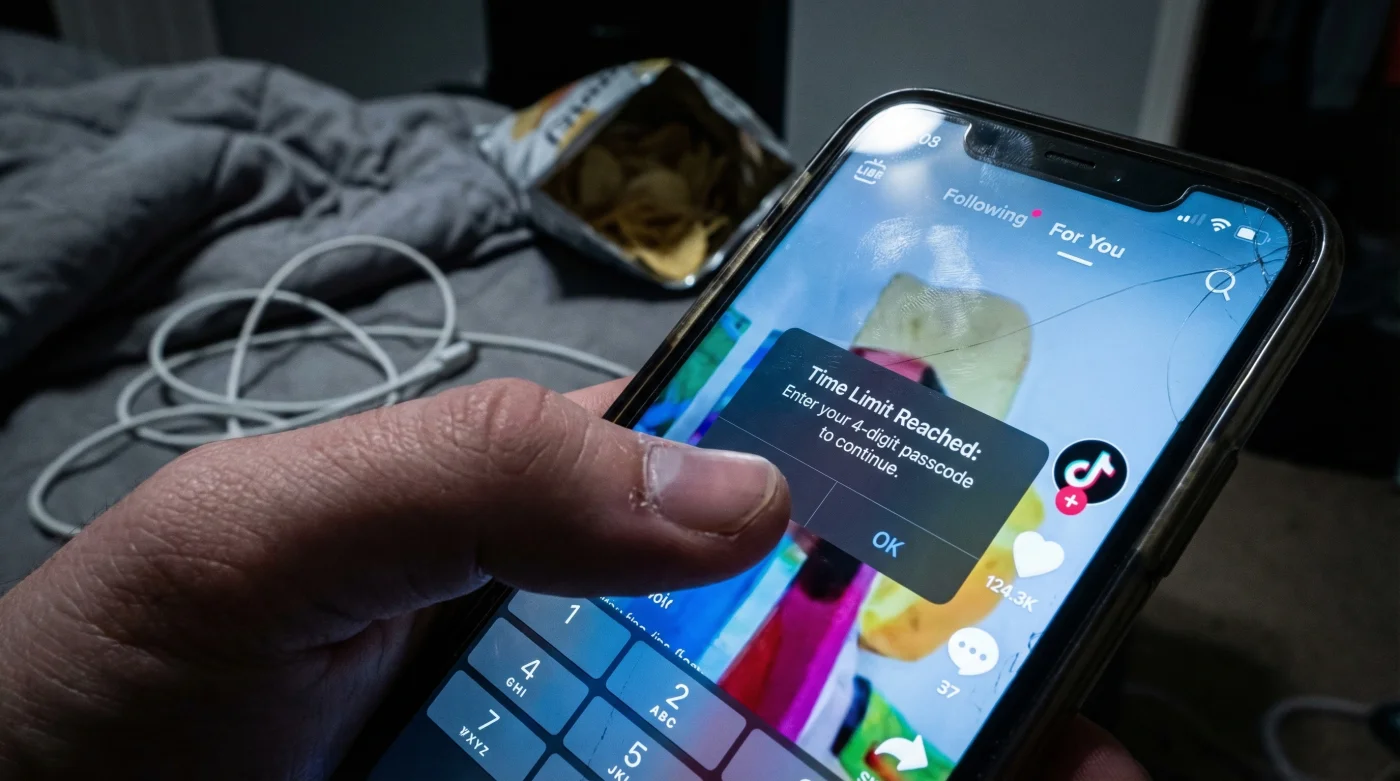
You unlock your phone for a quick update, intending to spend just five minutes catching up on the day’s trends. Before you realize it, an hour has evaporated into the digital ether, a phenomenon experts call "time blindness." This seamless, hypnotic loop of consumption—driven by the infinite scroll mechanism—is the gold standard for user retention in Silicon Valley. However, a massive institutional shift is disrupting this flow, specifically targeting the demographic most susceptible to algorithmic immersion.
TikTok has officially implemented a default 60-minute daily screen time limit for every account registered to a user under the age of 18. This is not merely a suggestion; it is a hardcoded barrier designed to introduce "narrative friction" into the user experience. When the hour mark is reached, the app ceases to autoplay, requiring a specific passcode to continue watching. This update marks one of the most aggressive moves by a major social platform to prioritize digital wellbeing over raw engagement metrics.
The New Default: Understanding the 60-Minute Barrier
For years, the conversation surrounding social media usage has focused on parental monitoring software that must be manually installed and configured. TikTok has flipped this dynamic by making the restriction the default state rather than an optional setting. This change affects tens of millions of users across the United States immediately.
The mechanism functions as a psychological speed bump. By interrupting the passive consumption of content, the app forces the user to make an active, conscious decision to continue. While users aged 13 to 17 can enter their own passcodes to bypass the limit, the mere act of disruption breaks the dopamine loop, potentially reducing the likelihood of extended "doom-scrolling" sessions.
Impact Analysis: Who is Affected?
| User Demographic | The Restriction Mechanism | Strategic Benefit |
|---|---|---|
| Under 13 Years | Strict 60-minute cap. A parent or guardian must enter a code to authorize an additional 30 minutes. | Maximum parental oversight; prevents unsupervised algorithmic exposure. |
| 13–17 Years | Default 60-minute prompt. User enters their own passcode to extend time. | Introduces cognitive friction; encourages self-regulation and awareness. |
| Parents/Guardians | Enhanced "Family Pairing" dashboard for custom limits. | Granular control over digital diet without requiring device seizure. |
While the ability for teenagers to bypass the lock may seem counterintuitive to strict restriction, behavioral psychologists argue that the pause itself is the critical intervention point.
The Science of Digital Dopamine and Why This Matters
To understand why a 60-minute limit is necessary, one must understand the neurochemistry of short-form video. These platforms operate on a variable reward schedule—the same psychological principle that powers slot machines. When you swipe up, you don’t know if the next video will be boring, funny, or life-changing. This uncertainty releases dopamine, the brain’s craving neurotransmitter.
- Throw ice cubes in the dryer to de-wrinkle shirts
- Drink hibiscus tea at breakfast to lower systolic pressure
- Disney+ blocks password sharing for all legacy US accounts today
- TikTok limits users to sixty minutes under a new default setting
- NOAA declares the La Niña weather pattern ended this morning
The Physiology of the Scroll
| Metric | Scientific Context | Recommended Dosing |
|---|---|---|
| Attention Span | Frequent context switching (every 15-60 seconds) fragments deep focus capability. | Limit rapid-fire content to 30-minute blocks max. |
| Dopamine Baseline | Chronic high-stimulation raises the baseline, making low-stimulation tasks (studying) feel painful. | Requires a 2-hour buffer before sleep. |
| Blue Light Exposure | Suppresses melatonin production, shifting circadian rhythms. | Night Mode filters or hardware stops at sunset. |
The introduction of a hard stop helps recalibrate this baseline, but navigating the technical setup is essential for families looking to customize these guardrails.
Navigating the Restriction: The Passcode Mechanism
The rollout of this feature brings specific technical requirements for users. Upon reaching the 60-minute limit, a full-screen prompt appears. It is important to note that this does not lock the phone or the app permanently; it pauses content delivery. For users under 13, the experience is more rigid, requiring parental intervention.
Alongside this default setting, TikTok has expanded its "Family Pairing" features. This allows parents to link their accounts to their children’s accounts, granting them remote control over screen time settings without needing physical access to the child’s device. This includes a dashboard that breaks down usage by time of day and content category.
Configuration Guide: Family Pairing vs. Default
| Feature Set | What to Look For (High Control) | What to Avoid (Loopholes) |
|---|---|---|
| Passcode Security | Parents should set a unique 4-digit code known only to them for under-13 accounts. | Avoid using common family birth years or codes the child already knows. |
| Screen Time Dashboard | Review the weekly summary to identify usage spikes (e.g., late night usage). | Don’t ignore the "number of times opened" metric—it indicates compulsive checking. |
| Muted Notifications | Enable scheduled notification muting (e.g., 9 PM to 8 AM). | Avoid leaving push notifications active during school hours. |
Understanding these controls puts the power back in the hands of the user and the parent, but technology is only one part of the equation; recognizing the physical signs of overuse is the other.
Diagnostic & Troubleshooting: Signs of Digital Fatigue
Even with the 60-minute limit, users can experience digital fatigue. It is crucial to recognize the symptoms that suggest the algorithm is impacting mental health or daily function. If the new default setting is frequently bypassed or causes extreme irritability, it may point to a deeper dependency.
The "Symptom = Cause" Diagnostic
- Symptom: Ghost Vibrations (Feeling the phone buzz when it hasn’t).
Cause: Hyper-vigilance. The brain is on high alert for social validation, spiking cortisol levels. - Symptom: Time Blindness (Losing hours without realizing it).
Cause: Flow State Abuse. The algorithm is perfectly tuned to remove stopping cues (like chapters in a book). - Symptom: Second Screen Syndrome (Watching TV while scrolling).
Cause: Dopamine Tolerance. One stream of information is no longer sufficient to stimulate the reward center.
Actionable Advice: If these symptoms are present, experts recommend a "digital detox" period. Reduce the limit from 60 minutes to 45 minutes using the custom settings in Family Pairing, and enforce a strict "phone-free zone" in the bedroom.
Beyond the Clock: Managing Screen Time Effectively
The 60-minute default setting by TikTok is a landmark moment in the tech industry’s approach to user safety. It acknowledges that willpower alone is often insufficient against billion-dollar engagement algorithms. By creating a default barrier, the platform is shifting the responsibility from the user to the system.
However, no software update can replace open communication. The passcode prompt serves as a reminder, but the conversation about why the limit exists is where the real educational value lies. Whether you are a parent managing a household or a user trying to reclaim your time, this update provides a necessary tool to regain control over your digital life.
Read More